Ship to
/ EN / USD

The Shopping Cart is Empty!

Shop special deals

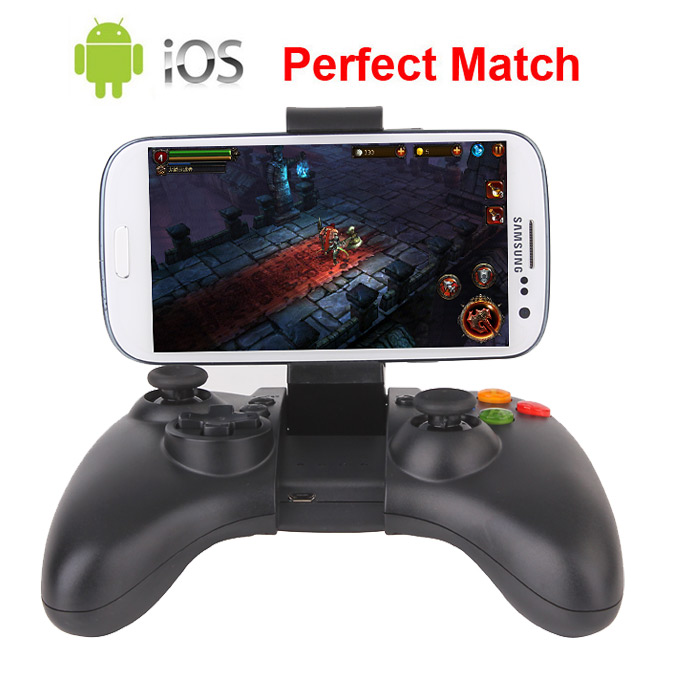
    NEW G910 Wireless Bluetooth Gamepad Game Controller for Android TV BOX/Mini PC/Smartphone/Tablet PC + IOS supported

    Ship to:
    United States
    Select the desired shipping method
    Shipping Company Estimated Delivery Time Shipping Cost
    *Please note: the shipping costs are only estimates; the actual shipping price will be shown on the order page.
    0 item(s) added
    View CartContinue Shopping

    Are you ready, guys?
    We have been pushing the factory for this game controller for long time.
    Now here it is, the perfect gift, just in time for the Holidays!!
     
    Ideally matched for the Android TV Box / Mini PC's which are sold by Geekbuying. We have already tested extensively with the following models: Tronsmart MK908II, Tronsmart MK908, Tronsmart t428, Imito QX1, CX-919, Rikomagic MK802IV and Minix Neo x7. All of the Android TV boxes listed above can connect instantly with this Bluetooth gamepad, and run flawlessly!
    There is no need to root your device if you own any devices mentioned above, no need to flash custom ROMs, and best of all, no need to do complicated and sometimes frustrating keymapping. It is a simple connect and play gaming device suitable for use by all ages! You can play most of the titles offered by Gameloft, Simulator games, and even PSP games with the “ppsspp” emulation app running directly from your Android TV box.
     
    Grab one now and get yourself a new game controller, endless free Android gaming possibilities, and a whole new way to experience console gaming without spending hundreds of dollars! Forget buggy, closed systems, and expensive alternatives such as the Ouya or similar competitors. All you need for amazing gaming on a budget is available to you right here.


    Highlights

    • Supports most major game titles, including hundreds of simulator / simulation-based games.
    • Controller has dual analog sticks, directional pad, shoulder buttons, triggers, full-sized grips and illuminated action buttons, plus a built-in rechargeable battery so you'll be ready to play whenever you want!
    • The Gamepad arm secures your Bluetooth-enabled Android device (up to 84mm) to the gamepad Controller and can hold 9cm width cell phone or 3.2'' - 6'' screen.
    •  Play games on your mobile device or connect to your TV to play in your living room! Requires Android device running 3.2 version or higher or the iOS operating system and a TV compatible with HDMI devices.
    • Compatible with Android and iOS Cell phones, Tablet PC’s, and PC Sticks with Bluetooth function.
    • Supported OS: Android / iOS / Windows
    • Connection: Bluetooth V3.0 + HS
    •  Battery: 500 mAH – Battery can be charged by powered USB ports, 3rd party chargers, or cell phone / tablet Micro-USB charger cables that use a compatible voltage.
    • Without any complicated setup program,you can play many kinds of big games.

    Note: MTK Phones can be supported with this gamepad Now !!!   We have tested it With Quad Core MTK6589 Smart Phone, instructions as below:

    GOOD NEWS! G910 Bluetooth Game Controller support MTK Smartphones now!


    Video review from real users:


    Features:
    This Gamepad can be used on the Android platform and the iOS platform. It can also be used on the PC. It can update its system by using the USB interface on the PC. It is suggested to use the gamepad on the device equipment with Android 3.2 systems or higher.
    This Gamepad has four operation modes: Gamepad, Keyboard, Touch, and Icade. Among these modes, Gamepad, Keyboard, and Touch support are specifically for Android and iOS devices, and the Icade mode only supports iOS devices. The controller  uses HID protocol for data transmission.
     
    Power on/off:
    Power on: turn the power switch to ON, press and hold the HOME button for 1-2 seconds. The handle will automatically try to connect with the host according to the data of the previous successful pairing mode.
    Power off: Press and hold the Home key for 5 seconds to turn it off. Toggling the switch to OFF can also turn off the device.
    Auto Sleep Timer: No action taken using the controller, the wrong code, or the failing of the connection in 10 minutes, the controller will shut down to go to sleep automatically.
     
    How to connect & use?
    If the controller is turned off, and the power button is in the ON position, please press the combination key listed below to enter the pairing mode of your choice. The three Bluetooth indicators’ light flashes quickly. (The 4th indicator light notes that it is charging when plugged in) The combination key for the different modes are as follows:
     
     
    Gamepad
    Keyboard
    APP
    Icade
    Combination key
    X+Home
    A+Home
    Y+Home
    B+Home
    Bluetooth indicators
    â' 
    â'¡
    â'¢
    â' â'¡
     
    Mode Instruction:
    1.    Gamepad Mode
      Press the X button first, and hold it down, then press the Home button briefly. Now you are in gamepad mode, go to your Smartphone or Android TV Box to do the Bluetooth setting, search / scan for the device, and then pair it. After connecting successfully, the first Bluetooth indicator light will be on.
      In Gamepad mode, you can play HID games directly, such as Shadowgun, DEADTRIGGER, Samurai Showdown, etc.
    2.    Keyboard mode
       Press the A button first, hold it down, and then press the home button briefly. Now you are in keyboard mode, go to your Smartphone or Android TV Box to do the Bluetooth setting, search / scan for the device, and then pair it. After connecting successfully, the second Bluetooth indicator light will be on.
      This mode support Android, PC, iOS, different emulator game platforms, and is suitable for key games and various simulator games. Specific operations may need to be handled online, such as initially opening the simulator game and then clicking the menu button. The users can set the custom buttons as needed from there.
    3.    APP Mode
       Press the Y button first, hold it down, and then press the home buttonbriefly , now you are in APP mode.
    4.    Icade Mode

       Press the B button first, hold it down, and then press the home button briefly, now you are in Icade mode. iCade mode only applies to the IOS platform. Note - After pairing successfully with your Apple device, you will need to change the language to English.


    We  play game on JK809 with G910  


     NEW G910 Wireless Bluetooth Gamepad Game Controller for Android TV BOX/Mini PC/Smartphone/Tablet PC + IOS supportedNEW G910 Wireless Bluetooth Gamepad Game Controller for Android TV BOX/Mini PC/Smartphone/Tablet PC + IOS supportedNEW G910 Wireless Bluetooth Gamepad Game Controller for Android TV BOX/Mini PC/Smartphone/Tablet PC + IOS supportedNEW G910 Wireless Bluetooth Gamepad Game Controller for Android TV BOX/Mini PC/Smartphone/Tablet PC + IOS supportedNEW G910 Wireless Bluetooth Gamepad Game Controller for Android TV BOX/Mini PC/Smartphone/Tablet PC + IOS supportedNEW G910 Wireless Bluetooth Gamepad Game Controller for Android TV BOX/Mini PC/Smartphone/Tablet PC + IOS supportedNEW G910 Wireless Bluetooth Gamepad Game Controller for Android TV BOX/Mini PC/Smartphone/Tablet PC + IOS supportedNEW G910 Wireless Bluetooth Gamepad Game Controller for Android TV BOX/Mini PC/Smartphone/Tablet PC + IOS supportedNEW G910 Wireless Bluetooth Gamepad Game Controller for Android TV BOX/Mini PC/Smartphone/Tablet PC + IOS supportedNEW G910 Wireless Bluetooth Gamepad Game Controller for Android TV BOX/Mini PC/Smartphone/Tablet PC + IOS supported


    Some famous games play on the Gamepad:



    Customer Photos

    Be the first to Upload A Photo of this product!

    Customer Videos

    Be the first to Upload A Video of this product!

    Customer Reviews

    5out of5
    Write A Review See all reviews
    5 star
    100%
    4 star
    0%
    3 star
    0%
    2 star
    0%
    1 star
    0%
    Clear
    View all
    View all Photos Videos
    All star
    All star 5 star 4 star 3 star 2 star 1 star
    Most relevant

          Questions & Answers

          Support & Firmware

          Learn More

          NEW G910 Wireless Bluetooth Gamepad Game Controller for Android TV BOX/Mini PC/Smartphone/Tablet PC + IOS supported
          Geekbuying's price match guarantee

          Fill in the details below for this product, after Geekbuying has verified the provided information, our sourcing team will get the best price possible.

          Item Code: 318373
          Please enter a valid email address

          Please make sure all the details filled in above are accurate. Our support team will send an email with a discounted offer if possible within 48 hours.

          Information submitted Our support team will send an email with a discounted offer if possible within 48 hours.
          Why buy from Geekbuying?
          Amazing offers

          Find best offers for smart gadgets at one place

          Easy & secure payments

          Pay directly via PayPal among other payment options

          Local stock & fast shipping

          Buy from local stock and ship within 24-hour

          Customer support

          24-hour customer support for all your queries

          Millions Trust Us

          5M+

          Trusted by 5M+ Users

          1000+

          Curated Brands

          Trustpilot

          Verified Store

          Local Warehouses

          24-Hour Dispatch

          Customer Support

          24/7 Live Chat

          1-2 Year Warranty

          EU-Based Warranty Support

          5M+

          Trusted by 5M+ Users

          1000+

          Curated Brands

          Trustpilot

          Verified Store

          Local Warehouses

          24-Hour Dispatch

          Customer Support

          24/7 Live Chat

          1-2 Year Warranty

          EU-Based Warranty Support


          Connect with us

          Spin. Unlock. Save.

          Get up to in coupons + G-coin rewards.*

          *New subscribers only. By subscribing, you agree to our Terms of Use & Privacy Policy.

          Subscribe for exclusive deals, early access to new arrivals, and personalized offers.

          Congratz!
          Reward Unlocked!
          Sign Up

          Use the same email for shipping or sign-up to ensure your reward is valid. Check your email for details on other coupons.